Roll Anime to Fight Codes (September 2026)
Your base only holds as long as the anime fighters standing in front of it, and getting a good lineup means rolling. A lot. That habit burns through gold fast, which is where Roll Anime to Fight codes come in: most of them hand over big gold drops, gold and diamond versions of characters, trait shards, capsules and trading tickets.
The working ones are in the table below. A few carry a requirement, like reaching a certain wave or level before the rewards land, so check that column before you wonder why nothing showed up.
All Roblox Roll Anime to Fight Codes
Expired Roll Anime to Fight Codes
Show all 21 expired Roll Anime to Fight codes
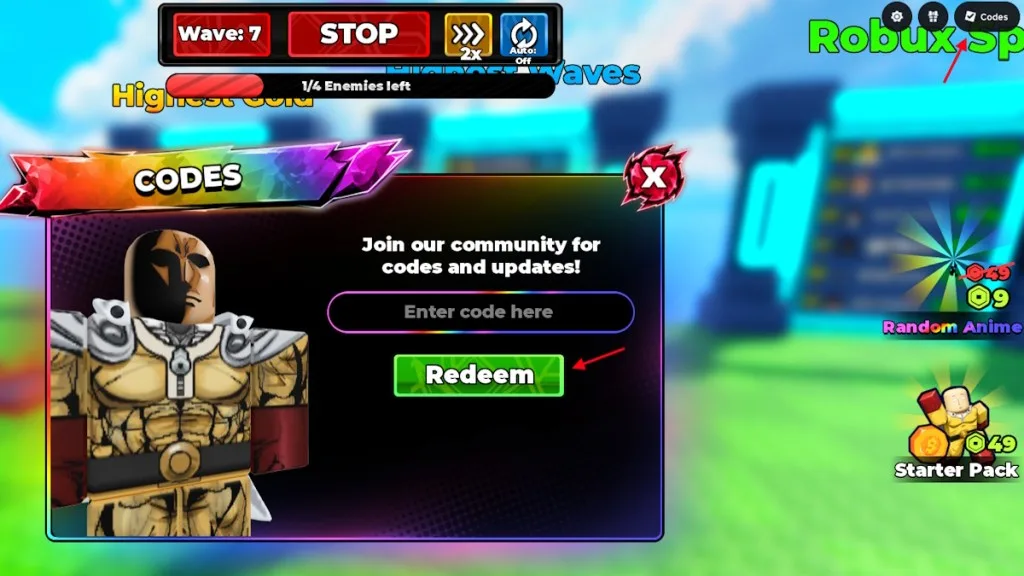
How to Redeem Roll Anime to Fight Codes
- Open Roll Anime to Fight in Roblox.
- Click the Shop icon on the right side of the screen.
- Scroll down until you reach the Redeem Codes section.
- Click the Redeem option.
- Type a working code into the ‘Code’ box.
- Hit OK to collect your rewards.
How to Get More Roll Anime to Fight Codes
If you would rather keep tabs on Roll Anime to Fight yourself, you can join the game’s official Discord server, which is the channel it uses for announcements. Roblox shows the experience has been updated recently, and fresh codes tend to appear around updates rather than at random. So when nothing new has turned up yet, your best move is patience: wait for the next update to land, then look again.
How Merging Animes Works in Roll Anime to Fight
Rolling is only half of it. Duplicate and spare animes are not dead weight, because you merge them to level your fighters up instead of hoping for a better pull every time. That is how a team stops being a pile of random characters and starts actually holding a wave.
From there it is survival against endless enemy waves, with checkpoints further in paying out bigger rewards the deeper you push. Rare animes and mutations are the long-term chase, and they are what make the difference when the waves stop being polite.
Why are my Roll Anime to Fight codes not working?
Before anything else, check that you have cleared the wave the game requires, because codes cannot be redeemed until you hit that milestone. If you are not there yet, keep playing and build up your progress first. If the wave requirement is already behind you and the error keeps showing up, look closely at how the code was typed. A single wrong character is enough to make the game reject it. The simplest fix is to copy the code and paste it straight into the entry box instead of typing it out by hand.